A travel charging kit works best when it is boring: one wall charger that covers your normal devices, one cable that can actually carry the power you expect, and a battery pack only if you will be away from an outlet. The trouble is that these three things are often sold as if they were interchangeable. They are not.
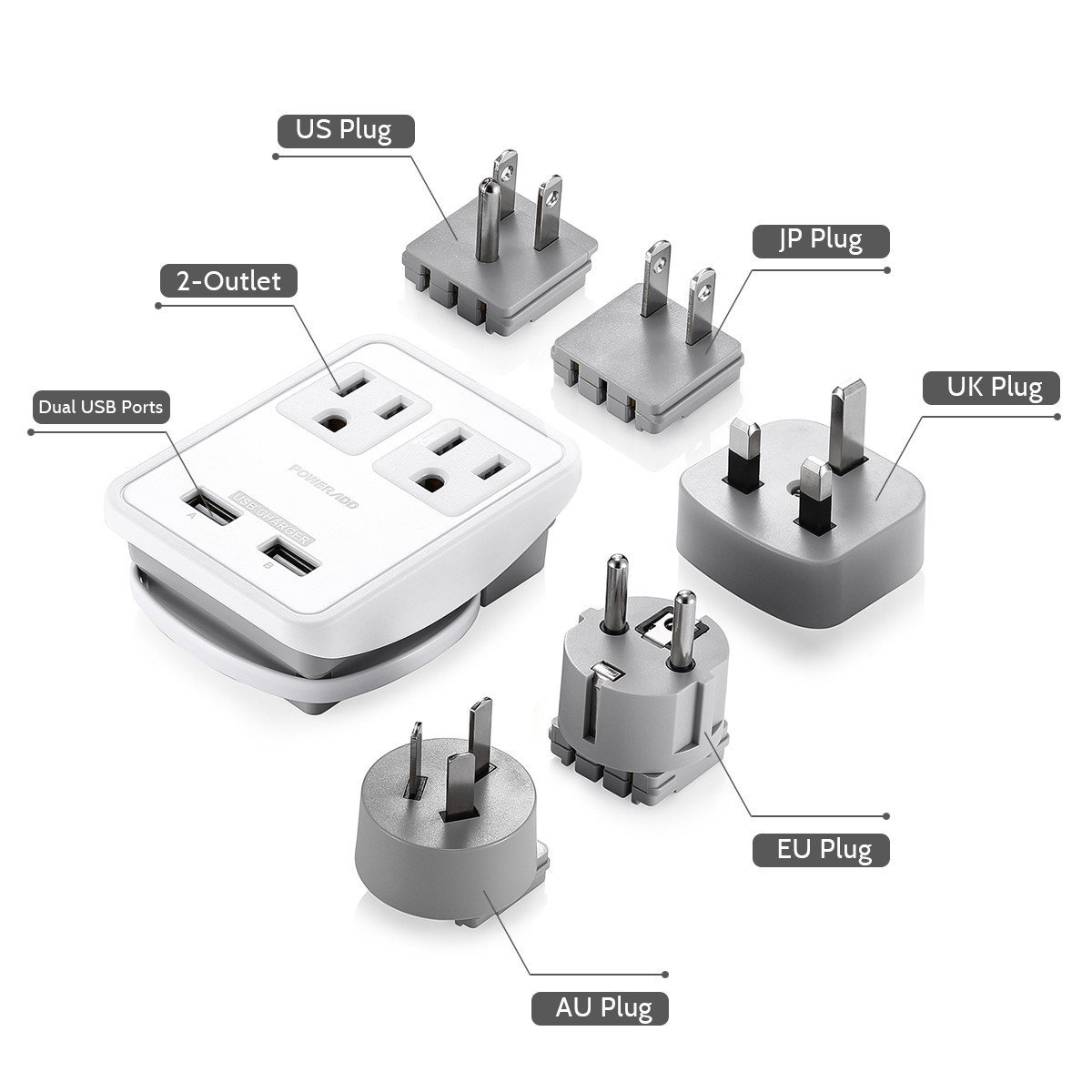
For most people travelling with a phone, earbuds, a watch, and a USB-C laptop, we would pack a compact 65-watt three-port charger, a good USB-C cable, and the plug adapter required at the destination. The charger supplies power; the plug adapter makes its prongs fit the outlet; and the cable has to support the power and data job you give it. A battery pack is optional, but it is worth bringing when a delayed flight, a long train day, or a full day of maps and photos would make a dead phone genuinely inconvenient.
The picks below are not meant to turn every trip into a gear project. They are a few sensible ways to build a kit around the devices you already own, plus the details that keep people from buying a 100-watt charger and discovering that their cable, outlet, or laptop is the actual limit.
Our picks at a glance
- Best compact charger for most trips: UGREEN Nexode Pro 65W 3-Port Charger. Its two USB-C ports and USB-A port make sense for a phone, small accessories, and a light laptop, without adding another bulky brick to the bag.
- Best one-charger setup for a larger laptop: Anker Prime Charger 100W, 3 Ports (A2688). It has two USB-C ports and one USB-A port, and is the better fit when your computer really benefits from 100 watts at the wall.
- Best high-output power bank for work travel: Anker Prime Power Bank 20K, 200W (A1336). It is substantial, expensive, and more capability than many travellers need, but it can be a useful backup for a laptop as well as a phone.
- Most important companion: a properly rated USB-C cable. See our USB-C cable guide before assuming the cable in the bottom of your bag will support laptop charging.
Best compact travel charger for most people: UGREEN Nexode Pro 65W 3-Port Charger
The UGREEN Nexode Pro 65W 3-Port Charger is the practical answer for the common travel loadout: a phone, a small USB-C accessory, and a laptop that charges comfortably at 65 watts or less. It has two USB-C ports and one USB-A port, so it handles the awkward overlap between a newer laptop and a still-useful USB-A cable without asking you to carry a second wall brick.
Sixty-five watts is not a magical number. It is simply enough headroom for many ultraportable laptops when they are being used lightly or charged while closed, with a phone attached as well. If your laptop came with a 45-watt, 60-watt, or 65-watt USB-C adapter, this is a sensible starting point. A larger 14- or 16-inch performance laptop may charge more slowly under a heavy workload, or may want more than 65 watts to keep its battery level steady while you work. That is not a failure of the charger; it is the point at which a 100-watt option becomes more appropriate.
We also like the basic shape of this choice for travel. A three-port charger cuts down on outlet juggling in hotel rooms and airport lounges. The charger is rated for 100–240-volt input, which is what you want for international use, but remember that this tells you only that the charger can accept local mains power. It does not make its prongs physically fit every socket. Pair it with a country-appropriate plug solution; our travel adapter guide explains that distinction in more detail.
There are two reasonable reasons to skip this pick. First, if every device you carry charges from USB-C and you never touch USB-A, a two-port USB-C-only charger may be tidier. Second, if you bring a power-hungry laptop and expect to work from it all day while charging a phone and a battery pack, buy the 100-watt option below. Trying to turn a 65-watt charger into a desk dock usually creates more frustration than it saves in weight.
Best travel charger for a laptop and several devices: Anker Prime Charger 100W, 3 Ports
The Anker Prime Charger 100W, 3 Ports is for people who do not want to negotiate with their laptop’s battery while travelling. Its two USB-C ports and one USB-A port share a 100-watt total output. With one USB-C device connected, either USB-C port can supply up to 100 watts; with all three ports in use, the stated combined maximum is 89 watts. That last number matters. It means this is capable hardware, but it still has a power budget rather than three separate 100-watt chargers hidden inside.
This is the charger we would choose for a person carrying a USB-C laptop, a phone, and a watch or older accessory. Give the laptop the top USB-C port, use the other USB-C port for the phone or a power bank, and leave USB-A for the small item that still needs it. If you are at a desk for several hours, plug in the laptop first. That avoids the unnerving moment when a charger reshuffles its output after you add another device and your computer briefly changes its charging status.
It is not necessarily the best value for a weekend away with only a phone and an e-reader. More wattage usually means more mass and a larger shape in the outlet. The point is not to collect the biggest number on the box; it is to avoid packing both your laptop’s original brick and a separate multiport phone charger. When one 100-watt unit replaces both, the trade-off becomes attractive.
Cable choice matters here more than it does with a phone. A cable that supports only 60 watts can prevent a 100-watt charger from delivering the laptop’s preferred rate. Look for a USB-C cable clearly marked for 100 watts or 240 watts when you need high-power laptop charging. Our USB-C cable guide breaks down the label language and the difference between a charging cable and one that can also handle fast data or an external display.
Best travel power bank for demanding devices: Anker Prime Power Bank 20K, 200W
A power bank should solve a specific problem. For many travellers, that problem is a tired phone at 5 p.m.; a modest battery pack is enough. The Anker Prime Power Bank 20K, 200W solves a different one: keeping a laptop-capable USB-C setup alive away from a wall outlet. It has two USB-C ports, one USB-A port, a 20,000-mAh rating, and a stated 200-watt maximum total output. Either USB-C port is rated for up to 100 watts on its own.
That capability has a cost. This is not the pack to toss into a tiny cross-body bag simply because it is available. It weighs roughly 545 grams, and its generous output is unnecessary if your only goal is one additional phone charge. Bring it when you expect to use a laptop on a train, at a conference, or during a long airport delay, and when you will actually recharge the bank overnight. Otherwise, a smaller pack is usually kinder to your shoulder and easier to use every day.
Capacity labels need a little perspective. A 20,000-mAh number is not the same as 20,000 mAh arriving at your phone. Battery voltage conversion, heat, cable losses, and the device’s own charging behaviour all take a share. Treat capacity as a way to compare similar packs, not a promise of a fixed number of phone charges. The more useful question is whether the bank’s output, its USB-C cable, and your device agree on a charging profile that is useful to you.
For flights, power banks belong in carry-on luggage, not checked bags. In the United States, the FAA permits lithium-ion batteries up to 100 watt-hours without airline approval; batteries from 101 to 160 watt-hours need airline approval, and airlines can impose tighter rules. This 20,000-mAh model is designed to sit below the usual 100-Wh threshold, but check the watt-hour label on the exact pack and your airline’s current policy before an international trip. Keep the pack accessible, do not use a damaged or recalled battery, and take it out of a carry-on if the bag must be gate-checked.
Build the kit around your devices, not around a spec sheet
Start by listing the things you will charge on a normal travel day. A phone, earbuds, watch, and e-reader do not justify a 100-watt charger. A laptop, phone, and camera battery charger may. A simple inventory makes the decision clear:
- Phone-only or phone plus accessories: a small 30- to 45-watt USB-C charger is generally enough. Add a compact battery pack if you spend long days away from an outlet.
- Phone, tablet, and light laptop: a 65-watt multiport charger is the comfortable middle ground. You can charge the laptop, then top up the phone without packing several bricks.
- Large USB-C laptop plus several devices: use a 100-watt charger and a 100-watt-or-better USB-C cable. The extra headroom is useful during work, video calls, exports, and other demanding moments.
- Camera gear, a portable monitor, or a laptop away from outlets: consider a high-output power bank, but verify the battery’s watt-hour marking and your airline’s rules before flying.
Then look at where you are going. If the wall outlet will use a different plug pattern, you need an adapter. A travel adapter does not turn local voltage into a different voltage; it changes the physical connection. Most contemporary USB-C chargers accept 100–240 volts and handle this gracefully, but check the fine print on your particular charger. Hair tools, older electronics, and appliances are a separate question and may need a true voltage converter—or may simply be a poor candidate for travel.
Finally, leave a little slack in the plan. A charger with exactly enough ports for every device can be annoying when one cable goes missing or a friend needs ten minutes of power. Three ports are useful not because every port will be in use all day, but because travel is full of small, temporary demands.
USB-C, Power Delivery, and cables in plain language
USB-C describes the connector shape. It does not guarantee a certain charging speed, a certain data rate, or video output. That is why two cables that look identical can behave very differently. One may charge a phone perfectly but limit a laptop to a lower rate. Another may support high power but move data slowly. A third may be built for displays and fast storage as well as power.
USB Power Delivery is the negotiation that lets compatible USB-C devices ask for the voltage and current they can use. The charger advertises options, the device accepts one, and the cable has to be suitable for the result. The charger does not force 100 watts into a phone; the device takes what it supports. But a weak or poorly specified cable can become the bottleneck. For laptop travel, keep one clearly labelled 100-watt or 240-watt USB-C-to-USB-C cable in the pouch and reserve it for the computer or power bank.
Long cables are convenient in awkward hotel rooms, but they are not automatically better. A three-foot cable is easier to pack and makes less of a mess on an airport table. A six-foot cable is helpful when an outlet is behind a bed or a desk. Bring the length you repeatedly wish you had, not three lengths “just in case.” For the details, including data speed and display support, see our guide to USB-C cables.
Why total wattage is not the whole story
A charger marked 100 watts may be exactly what you need, but the number only describes its ceiling. Multiport chargers divide available power across connected devices, often in fixed combinations. A laptop can draw less than its maximum when the battery is nearly full; a phone might charge quickly for a while and then slow down. Heat can also cause devices and batteries to reduce charging speed. These are normal parts of modern charging, not signs that every charger is defective.
The useful habit is to plug in the most demanding device first and use the best cable for it. If the laptop needs attention, give it a USB-C port before you connect the phone and battery pack. If the system starts charging more slowly after you add a third device, remove the least important one for a few minutes. This sounds obvious, but it is much less stressful than staring at a battery icon during a boarding call.
Be wary of “up to” claims when comparing products. A charger can be technically capable of a high number without delivering that number to every port simultaneously. Read the port-allocation chart in the manufacturer’s specifications if your work depends on it. For casual travel, a reputable 65-watt three-port charger is usually simpler and more pleasant than a large unit purchased for capability you will never use.
Travel adapters are not voltage converters
It is easy to call every plug accessory a “converter,” but that can lead to expensive mistakes. A plug adapter changes the shape of the plug. A voltage converter changes electrical voltage. They are different tools.
Your USB-C charger may already be ready for the voltage part of international travel if its label says 100–240V, 50/60Hz. In that case, you only need a safe way to fit it into the local outlet. Use a quality adapter that grips the charger securely, especially with a heavier 100-watt brick. A loose stack of adapter, charger, and cable is a poor place to save a few dollars.
Do not assume the same rule applies to an old hair dryer, a heated styling tool, or a single-voltage appliance. Check that item separately. If the label does not support the local voltage, a plug adapter alone will not protect it. Our travel adapter guide is the place to start when you are choosing the physical plug setup for your destination.
Power banks and air travel
Airline battery rules are the one part of this category that deserves a quick check before every trip. Regulations and airline policies can change, and international carriers may be stricter than a general rule suggests. Start with the watt-hour figure printed on the power bank, not only the marketing mAh number. As a broad U.S. reference, power banks and spare lithium batteries must be carried in the cabin, not checked. Up to 100 Wh is normally allowed; 101–160 Wh requires airline approval; above 160 Wh is not allowed on passenger aircraft.
Keep the bank in a protective pouch, especially if it shares a pocket with keys, coins, or loose metal accessories. Do not bring a pack that is swollen, cracked, overheating, or subject to a safety recall. If a gate agent checks your carry-on, take the power bank out and keep it with you. Those few seconds can prevent an avoidable problem at the aircraft door.
There is also a practical rule: recharge the battery pack before the day you expect to need it. A high-output pack that is empty is just a heavy object. If you routinely travel with one, put it on the charger while you are packing rather than relying on an airport outlet.
Hotel, airport, and public-outlet habits that help
Use your own wall charger when you can. Public USB ports and mystery cables are not as predictable as an outlet plus the equipment you packed. In airports, a small charger with a short cable makes it easier to stay near your device instead of leaving a phone on the floor beside a crowded charging station.
At a hotel, make a single charging station near the door or desk. Put the charger, battery pack, and spare cable there every night. It sounds fussy, but it eliminates the classic departure-morning search for the one cable still behind the bed. A small zip pouch makes the kit easy to move between a personal item and a day bag without losing pieces.
On arrival, check the outlet before you unpack the whole setup. Some older rooms have loose outlets that will not hold a heavy wall charger confidently. When that happens, move to a firmer outlet, use the provided adapter carefully, or charge devices one at a time instead of hanging a large power bank and several cables from the wall.
Common travel-charging mistakes
- Buying a plug adapter when you need a charger. An adapter cannot create USB-C ports or supply more power; it only changes plug shape.
- Assuming every USB-C cable supports laptop power. Bring one cable labelled for the wattage you need and keep it separate from the cheap emergency cable.
- Expecting the maximum wattage from every port at once. Check a multiport charger’s power-sharing chart, especially for a laptop-plus-phone setup.
- Putting a power bank in checked luggage. Keep it in your carry-on and confirm its watt-hour rating and airline policy before flying.
- Bringing too much hardware. One appropriate charger, two good cables, an adapter, and a power bank only when needed is usually enough.
- Forgetting to charge the battery pack. Make it part of your packing routine, not a task for the boarding area.
How we chose
We focused on a small set of questions that make a travel charger useful after the novelty wears off: Does it have a realistic port mix? Can it accept common international mains voltage? Does its stated output match the needs of a phone, tablet, or laptop? Is its power-sharing behaviour clear enough to plan around? And, for power banks, is the capacity and output meaningful for the extra size and weight?
We also avoid treating a single product as the answer for everyone. A 65-watt charger is a better buy for a light laptop and a phone. A 100-watt charger earns its space when it replaces a big laptop brick and still leaves room for accessories. A 200-watt battery pack is for people who have a credible reason to power a laptop away from a wall; most phone-only travellers should choose something smaller.
Product specifications and airline rules are worth revisiting over time. We update this guide when a meaningful hardware change, policy change, or availability change affects the recommendation. Prices move much more often than the underlying decision, so use the links as a current availability check rather than treating any price as permanent.
Travel charger and power bank questions, answered
Is a 65-watt charger enough for a laptop?
For many USB-C ultraportable laptops, yes. It is a sensible fit if the original charger is 65 watts or less and you are doing ordinary work. A bigger or more demanding laptop may charge slowly or lose ground under a heavy workload, so use a 100-watt charger when the computer calls for it.
Can I use a travel adapter with a USB-C charger?
Yes, if the charger’s input label supports the destination’s voltage—many current USB-C chargers list 100–240V, 50/60Hz. The adapter changes the plug shape. It does not convert voltage, so always check the label on the charger itself.
Should I buy a 100-watt cable for every device?
No. One reliable high-power USB-C cable is enough for most travel kits. Use it for the laptop or high-output power bank, then bring a second everyday cable for the phone or accessories. Buy data or display capability only if you will use it.
Can I fly with a 20,000-mAh power bank?
Most 20,000-mAh packs fall at or below the common 100-Wh limit, but you should check the watt-hour label on the exact model and the current policy of every airline on your itinerary. Carry power banks in the cabin, never in checked baggage.
Do I need a power bank on every trip?
No. If your days include hotel, office, or café outlets, a compact wall charger is often more useful. Add a battery pack for long transit days, outdoor use, unreliable power, or any trip where a dead phone would create a real problem.