SuperGrail may earn a commission from qualifying Amazon purchases. Keyboard recommendations use current layout, connection, battery, and compatibility documentation; they do not represent a hands-on typing trial.
The short answer
The Logitech MX Keys S is the safest full-size recommendation for most desk workers. Its quiet scissor switches, numeric keypad, adaptive backlight, Bluetooth and included Logi Bolt receiver, and three-device Easy-Switch keys cover a broad office setup. It is heavy and relatively expensive, however, and its backlight cuts claimed battery life from months to days. Travelers should buy the smaller, battery-sipping Pebble Keys 2 K380s instead.
A keyboard is a physical interface before it is a feature list. Decide whether you need a number pad, dedicated navigation keys, full-size arrows, and mechanical switches. Then identify the connection required by each computer. Bluetooth saves a port and works with tablets; a proprietary 2.4GHz receiver can be easier in firmware screens and congested offices; a wired mode is valuable for gaming and troubleshooting.
Current manufacturer specifications, manuals, supported systems, battery claims, receiver requirements, and layouts were compared editorially. No latency or key-force measurements were made. A larger display can change the value of desk shortcuts, so pair this advice with our computer-monitor guide. If the keyboard is used for account access, our password-manager guide covers the security decision that hardware cannot solve.
Quick picks
| Pick | Best for | Main facts | Who should skip it |
|---|---|---|---|
| Logitech MX Keys S | people who type across two or three Windows, macOS, Linux, ChromeOS, or iPadOS devices | full-size scissor layout; Bluetooth Low Energy and included Logi Bolt receiver; three Easy-Switch channels; USB-C charging; up to 10 days with backlight or five months without | you want a mechanical feel, a light travel board, replaceable batteries, or adjustable rear feet |
| Keychron B1 Pro | budget-conscious laptop users who want three connection types and a compact layout without mechanical switches | 75% low-profile scissor layout; 2.4GHz, Bluetooth, and USB-C wired modes; up to 300 claimed hours; 800mAh battery; ZMK customization | you need a number pad, familiar enterprise support, or illuminated keys |
| Logitech Pebble Keys 2 K380s | tablet, phone, and laptop users who carry one keyboard between rooms or bags | compact multi-OS scissor layout; three Bluetooth channels; compatible with optional Logi Bolt receiver; two AAA batteries; up to 36 months claimed life | you require backlighting, a number pad, a receiver in the box, or widely spaced full-size keys |
| Keychron K3 Max | typists and casual gamers who want low-profile mechanical switches, fast wireless, and deep remapping | 84-key 75% low-profile mechanical layout; 2.4GHz and wired polling up to 1000Hz; Bluetooth 5.1; QMK/VIA; optional hot-swap versions; 1550mAh battery | you need long battery life with RGB, a number pad, or a zero-maintenance office board |
| Apple Magic Keyboard with Touch ID USB-C | Apple-silicon Mac owners who value fingerprint authentication and the native Mac key layout | Touch ID sensor; compact Apple layout; Bluetooth; USB-C charging and pairing; about a month or more claimed battery life; 243g | you use an Intel Mac, regularly switch to Windows, want backlighting, or need adjustable tilt |
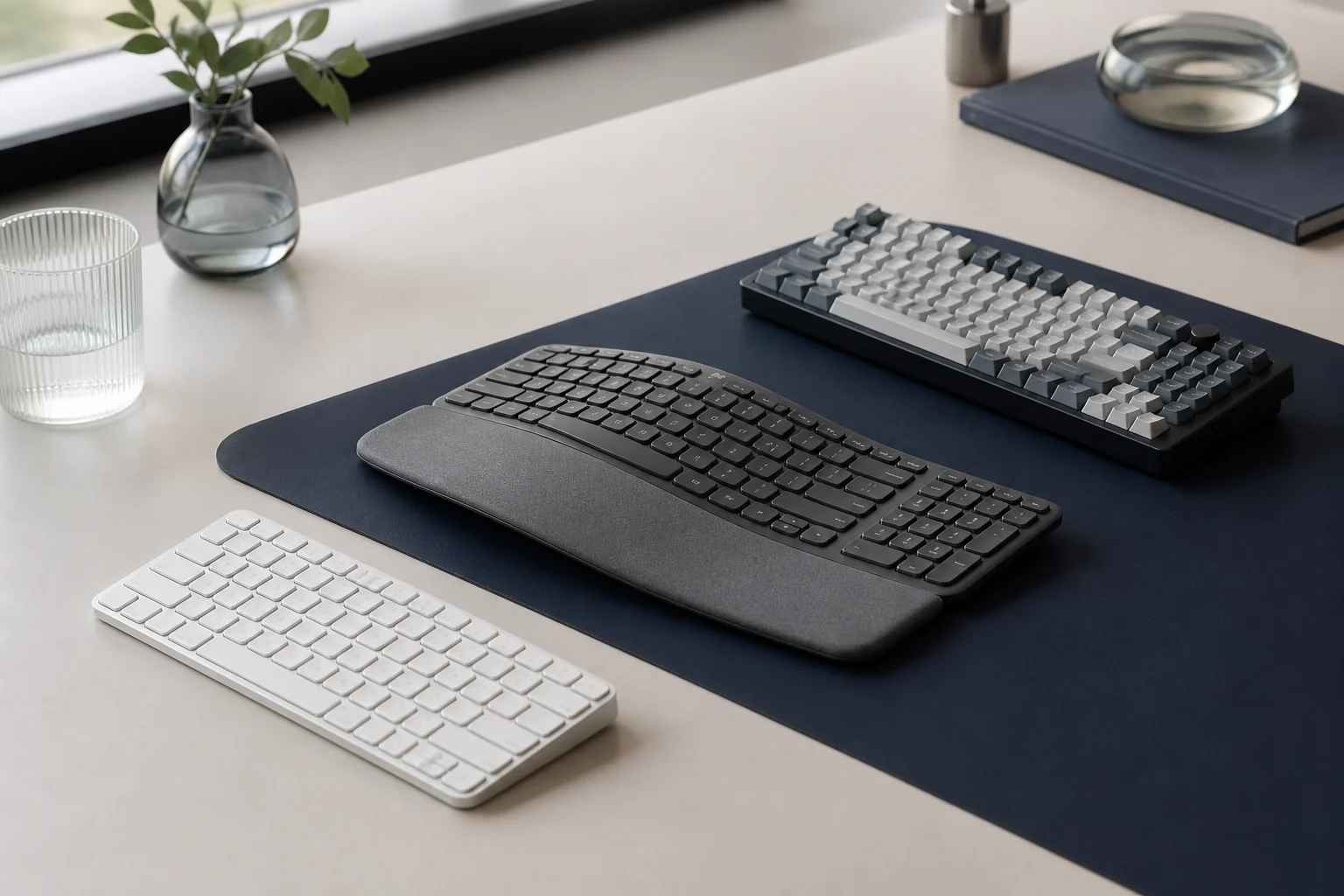
The five layouts trade desk width, navigation keys, switch construction, receiver support, and platform integration. Start with the keys and computers used every day, then choose the least complicated connection that serves them.
Why these five picks differ
1. Logitech MX Keys S: best full-size work keyboard
Best for: people who type across two or three Windows, macOS, Linux, ChromeOS, or iPadOS devices. Skip it if: you want a mechanical feel, a light travel board, replaceable batteries, or adjustable rear feet.
MX Keys S gets the fundamentals right for a permanent desk. The dished low-profile keys are quiet, the number pad and navigation cluster remain intact, and the metal-backed 810g body stays planted. Labels accommodate Windows and Mac conventions, which is useful in a mixed-device office but visually busier than a platform-specific board.
Logitech specifies up to three Bluetooth or Logi Bolt connections. The included receiver is Bolt, not the older Unifying system, so existing Logitech dongles are not automatically interchangeable. Options+ unlocks remapping and Smart Actions on Windows and macOS; basic typing works on more systems without it. Software-dependent shortcuts should not be the reason to buy if your employer blocks utilities.
The backlight is both pleasant and costly. Logitech claims up to 10 days under its predefined illuminated settings versus up to five months with lighting off. Hand-proximity and ambient-light sensors reduce waste, yet a user who dislikes frequent charging should disable illumination. The board can operate while connected by its USB-C charging cable, but that cable does not turn it into a generic wired USB keyboard.
On Logitech MX Keys S, verify that the package says MX Keys S and includes a Logi Bolt receiver. The older MX Keys, Mac-specific versions, and receiver-free bundles differ in legends or included hardware.
2. Keychron B1 Pro: best value rechargeable keyboard
Best for: budget-conscious laptop users who want three connection types and a compact layout without mechanical switches. Skip it if: you need a number pad, familiar enterprise support, or illuminated keys.
The B1 Pro competes by including capabilities that are often split between price tiers. Its 75% layout retains a function row and arrows, it can use a low-latency 2.4GHz receiver, pair by Bluetooth, or work over USB-C, and Keychron rates the 800mAh battery for up to 300 hours. The keys are conventional low-profile scissor mechanisms, not the taller mechanical switches associated with much of Keychron's range.
ZMK-based customization is a meaningful bonus for people willing to configure layers and shortcuts, but it introduces learning and browser-tool dependence. A buyer who wants to open a box and never think about firmware may prefer Logitech. The compact layout also compresses the navigation area; anyone living in spreadsheets should price a separate number pad or choose MX Keys S.
Because the low price is part of the case, verify what the current bundle includes. Receiver storage, regional key legends, and cable contents can vary. This is the practical value pick when a rechargeable battery and wired fallback matter more than backlighting or a premium chassis.
Check Keychron B1 Pro for B1 Pro rather than the many similarly slim Keychron mechanical boards. The deciding specification is the scissor-key 75% layout with Bluetooth, 2.4GHz, and a real USB-C input mode.
3. Logitech Pebble Keys 2 K380s: best compact travel keyboard
Best for: tablet, phone, and laptop users who carry one keyboard between rooms or bags. Skip it if: you require backlighting, a number pad, a receiver in the box, or widely spaced full-size keys.
The K380s is easy to recommend because it asks little of a travel setup. Two AAA cells avoid a charging cable, the rounded compact board slips into a bag, and three Easy-Switch buttons move among a laptop, tablet, and phone. Logitech claims up to 36 months of battery life, although real life depends on use and cells.
Its circular scooped keys feel closer to a small laptop than a desktop keyboard. That makes it quiet in a shared room but can crowd large hands, and the compact arrow cluster is poor for sustained spreadsheet navigation. There is no backlight for dim flights. Bluetooth is included; Logi Bolt compatibility exists, but the receiver is sold separately.
The K380s is a companion, not a substitute for every desk board. Choose it when portability and long idle life outrank maximum typing space. Protect the keys in a sleeve rather than dropping the keyboard loose beside chargers that can press keys continuously.
A Logitech Pebble Keys 2 K380s listing should identify K380s or Pebble Keys 2 and the desired regional layout. The optional Bolt receiver is normally absent from the consumer package, so do not infer one from compatibility wording.
4. Keychron K3 Max: best compact wireless mechanical pick
Best for: typists and casual gamers who want low-profile mechanical switches, fast wireless, and deep remapping. Skip it if: you need long battery life with RGB, a number pad, or a zero-maintenance office board.
The K3 Max is the choice for people who can explain why they want a mechanical keyboard. Its 75% frame keeps arrows and a function row, while 2.4GHz and wired modes run at a specified 1000Hz polling rate. Bluetooth supports convenient multi-device use at a lower 90Hz rate. QMK/VIA permits extensive remapping without making the basic layout proprietary.
Variant selection requires care. Keychron sells different switch types, lighting, and hot-swappable configurations. Hot-swap support is limited to compatible low-profile mechanical switches; standard full-height MX switches do not fit. The short chassis is easier on the wrists than a tall mechanical case, though a switch you dislike remains irritating regardless of height.
Battery life is the compromise. Keychron cites roughly 73 hours with the backlight off and around 42 hours with RGB at its lowest brightness for the standard specification. That is days or weeks, not the K380s's multi-year pattern. Buy the K3 Max for feel, 2.4GHz performance, and customization, then accept that charging is part of ownership.
Choose the Keychron K3 Max variant only after selecting switch, backlight, and hot-swap status. K3 Max low-profile sockets accept a narrower switch family than full-height MX-style boards.
5. Apple Magic Keyboard with Touch ID USB-C: best for an Apple-silicon Mac
Best for: Apple-silicon Mac owners who value fingerprint authentication and the native Mac key layout. Skip it if: you use an Intel Mac, regularly switch to Windows, want backlighting, or need adjustable tilt.
Apple's current USB-C Magic Keyboard earns a specialist place for Touch ID. On a compatible Apple-silicon Mac, the sensor handles login and purchase authentication without reaching for the laptop. The compact 243g body, Mac-specific function row, and automatic pairing fit a clean single-platform desk.
Compatibility is the boundary. Touch ID requires a Mac with Apple silicon and an appropriate macOS version; buying this board for an Intel Mac discards its defining benefit. The keys are not illuminated, the shallow wedge has no adjustable feet, and the compact model omits the number pad. Apple sells an extended Touch ID version separately.
Apple claims about a month or more between charges and includes a woven USB-C cable. It can pair and charge through the Mac's USB-C port. This is the cohesive Mac pick, but MX Keys S is more flexible for a household that switches operating systems, and the K3 Max offers a more configurable physical typing experience.
For Apple Magic Keyboard with Touch ID USB-C, confirm USB-C charging, the compact versus numeric-keypad layout, and an Apple-silicon Mac requirement for Touch ID. A visually similar Intel-era Magic Keyboard cannot provide the same authentication feature.
How to choose
Choose the layout before the brand
A full-size board is roughly 100% and includes the number pad. Tenkeyless removes that pad; 75% compresses navigation while retaining a function row; 65% goes smaller still. Count the keys you use during a normal hour. Buying too small and rebuilding every shortcut with layers is rarely a bargain.
Open the applications used most and count actual number-pad, navigation, and function-row actions. That inventory shows whether a compact layer saves space or merely moves familiar keys into slower combinations.
Separate connection types
Bluetooth is broadly compatible but can be unavailable before the operating system loads. A Bolt or 2.4GHz receiver consumes a USB port and is not universally interchangeable. True wired mode sends keystrokes over the cable; charging through USB-C does not necessarily do so. The MX Keys S cable charges only, while the Keychron boards support wired input.
Assign Bluetooth, receiver, and wired connections to specific computers on paper. The exercise catches charging-only USB-C ports and proprietary dongles before a keyboard is expected to work in firmware or recovery screens.
Treat battery claims as scenarios
Lighting is the largest variable. MX Keys S moves from a claimed 10 days to five months when the backlight is disabled, and the K3 Max has much shorter estimates with RGB. Replaceable AAA batteries suit infrequent travel use; rechargeable cells reduce disposable waste but will eventually age.
Compare battery figures in the same lighting state. A backlit estimate measured in days and an unlit estimate measured in months are separate operating choices, not contradictory claims.
Check software and workplace rules
Remapping tools can be useful and can also be blocked on managed computers. Basic typing, media keys, and device switching should work without an account. If a shortcut depends on Options+, VIA, or another utility, verify operating-system support and whether settings are stored on the keyboard.
Check whether workplace policy permits Options+, VIA, browser configurators, and firmware utilities. Essential shortcuts should remain accessible when optional software cannot be installed.
Key feel is not a quality ranking
Scissor switches are shallow and quiet. Low-profile mechanical switches offer distinct travel and replaceable-switch options on some boards, but create more noise and variation. Switch color names are not standardized across every manufacturer. Return policy matters when you cannot try a layout and switch together.
Select switch construction for noise, travel, and maintenance instead of treating mechanical as a premium grade. A shared office may benefit more from a predictable scissor board than a customizable switch that distracts nearby coworkers.
Setup, care, and ownership
Pair the primary computer first and assign device slots deliberately. A small label under the board can record which number belongs to which machine. Keep the receiver in its storage recess or a dedicated pouch when traveling; replacing a proprietary dongle can be inconvenient.
Set the correct Windows or Mac layer before remapping keys. A swapped modifier often looks like a connection problem. On shared machines, test the keyboard at the login screen before removing the old wired board.
Clean with the keyboard powered off. Use air and a soft brush for loose debris, then a barely damp cloth on keycaps. Do not spray cleaner into switches. Check the maker's removal instructions before pulling low-profile keycaps; their stabilizers can be fragile.
Rechargeable boards last longer when they are not stored empty for months. Replace alkaline cells promptly if leakage appears. If Bluetooth becomes unreliable, remove stale pairings, update approved firmware, and test close to the computer before blaming radio interference.
A keyboard cannot correct poor desk height. Keep elbows near a neutral angle and wrists unbent rather than adding a thick rest automatically. The right rest supports the palm during pauses; it should not force the wrist upward while typing.
Save the keyboard’s exact regional layout, receiver type, pairing slots, and firmware page with its purchase record. A damaged charging lead, leaking AAA cell, failing switch, or unresponsive receiver should be handled according to that model’s support instructions, not advice for a similar family name.
Credible competition
Logitech's Signature Slim K950 offers a less expensive full-size route with multi-device support, but MX Keys S has the more refined backlight and key treatment. NuPhy Air75 variants are credible low-profile mechanical competitors with attractive construction; Keychron wins here on QMK/VIA familiarity and broad variant documentation. Microsoft's older Designer Compact and Surface keyboards can fit a Windows-first desk, yet availability and product-line transitions make them less dependable recommendations. Gaming boards from Razer and SteelSeries add lighting and fast receivers, but they cost more and their software ecosystems are harder to justify for ordinary office typing.
A keyboard sale changes value only after layout and connection match. Compare key legends, included receiver, switch variant, return window, and platform software before letting a discount decide between superficially similar boards.
How we researched
The keyboard review used current Logitech, Keychron, and Apple specification pages, compatibility lists, manuals, and battery notes available through August 10, 2026. It compared physical layouts, switch types, wired versus charging-only USB-C behavior, Bluetooth and receiver channels, supported operating systems, and variant-specific contents.
No typing-speed, switch-force, radio-latency, acoustic, or battery-runtime test was conducted. Published endurance remains conditional on each maker’s lighting and usage assumptions, while feel judgments are framed as buyer preferences; variable prices and outbound source citations were left out of the article.
Frequently asked questions
Is Bluetooth too slow for typing?
For ordinary typing, no. Latency becomes more relevant in competitive games and when a crowded radio environment causes dropped input. A well-implemented 2.4GHz receiver or wired mode is preferable when consistent low latency is the priority.
Can one keyboard switch between Mac and Windows?
Yes, if it supports multiple devices and both operating systems. Legends and modifier positions can still differ. MX Keys S provides dual-purpose labels; Keychron supplies platform switching and often alternate keycaps. Touch ID remains Mac-specific.
Do I need a number pad?
Buy one if you enter numeric data regularly. It widens the mouse reach, so occasional users may prefer a compact keyboard plus a separate pad used only when needed. Do not pay for portability and then carry a full-size board.
Are mechanical keyboards better?
They offer more switch choice, travel, serviceability on hot-swap models, and a distinct feel. They can also be louder, thicker, heavier, and more demanding to choose. A good scissor keyboard is better for someone who values quiet simplicity.
Can I use a wireless keyboard in BIOS or recovery?
Often with a USB receiver or wired mode, but Bluetooth may not be available until the operating system loads. Keep a basic wired keyboard for setup and recovery if the computer or encryption workflow is critical.
Final recommendation
Logitech MX Keys S is the full-size default for a stable work desk because its three channels, quiet scissor layout, number pad, and adaptive backlight solve common office needs. Pick the K380s for a travel bag, the K3 Max for mechanical customization, the B1 Pro for compact value, or Apple’s board when Touch ID is the point.