SuperGrail may earn a commission from qualifying Amazon purchases. The charger advice below comes from current electrical tables and maker documentation; no unit was bench-tested.
The short answer
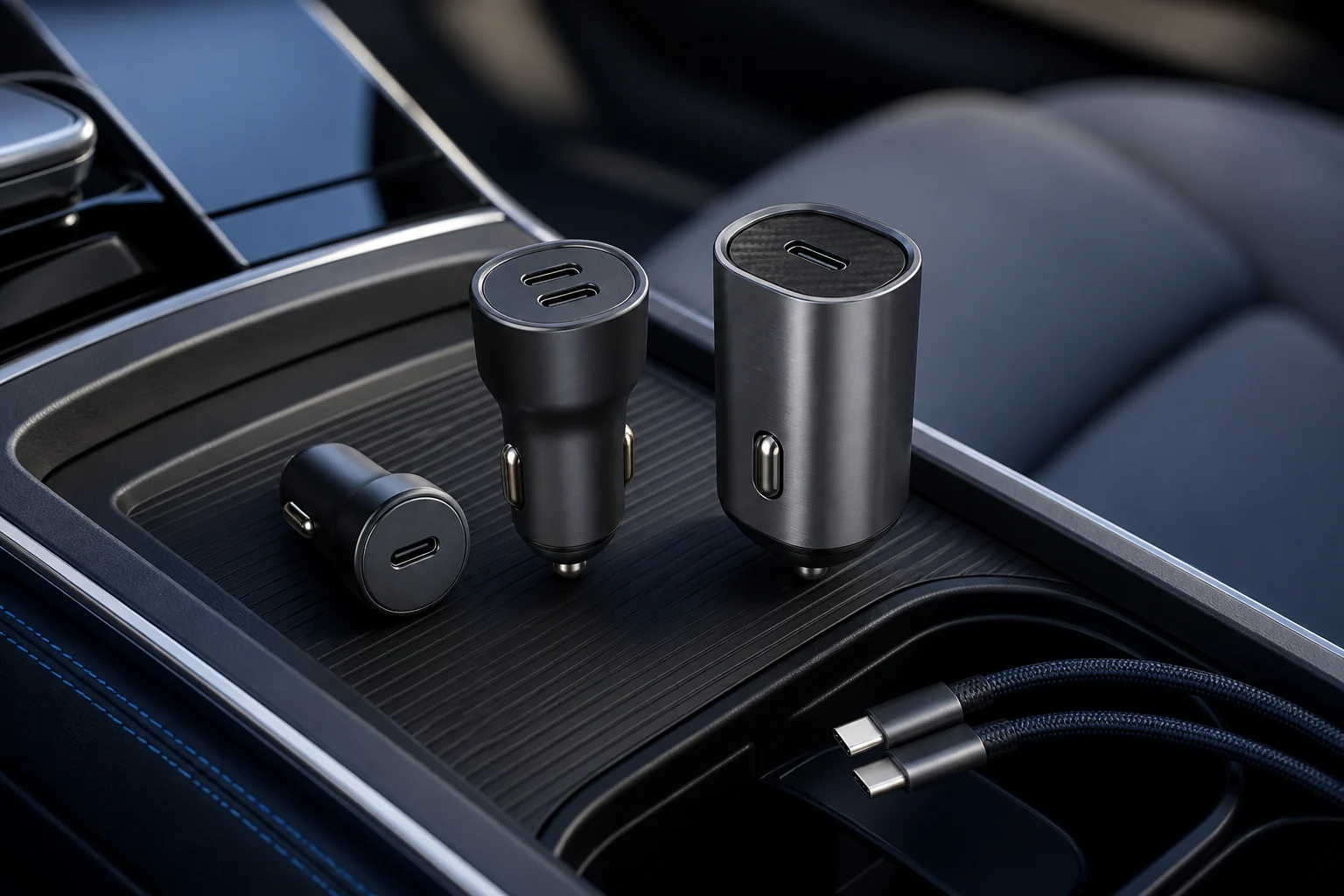
For most drivers who charge a phone, tablet, or thin-and-light laptop, the Anker 535 Car Charger 67W A2731 is the most balanced choice. One USB-C device can receive up to 67W, there are two USB-C ports plus USB-A, and a three-device load still leaves the primary USB-C port at a useful 45W. The catch is availability: Anker's own US page currently marks A2731 sold out, so check the exact model and seller rather than assuming every “535” listing is identical. If stock is poor, the UGREEN 130W model is the stronger laptop-first alternative.
A car charger's total is only the start of the decision. Port maps change when a second or third cable is connected, some phone protocols require PPS, and a 100W laptop output usually needs a 5A e-marked cable. The vehicle socket matters too. A 12V accessory circuit with a 10A fuse cannot supply every advertised combination indefinitely after conversion losses, while a loose or corroded socket can heat under a load that a healthy socket handles.
Current maker product pages, support documents, electrical tables, and warranty terms supply the factual basis. No output or temperature measurements were made for this guide. For keeping a phone visible while driving, see our smartphone car-mount guide. For the electrical differences between plug shapes and voltage conversion, our travel-adapter guide explains what an adapter does and does not do.
Quick picks
| Pick | Best for | Main facts | Who should skip it |
|---|---|---|---|
| Anker 535 Car Charger 67W A2731 | a mixed phone, tablet, and occasional USB-C laptop kit where three ports are genuinely useful | two USB-C ports and one USB-A port; up to 67W from USB-C; 45W from USB-C1 with three devices connected; 12–24V input | you need a guaranteed current first-party supply, 100W laptop charging, or two high-power outputs at the same time |
| UGREEN 130W 2C1A USB C Car Charger 90889 | drivers who need meaningful laptop power and still want ports for a phone or accessory | 100W USB-C2, 30W USB-C1, and 22.5W USB-A single-port ratings; 130W combined claim; 12–24V socket support; 100W cable included | your car outlet is worn, low-rated, or rarely used for anything larger than a phone |
| Belkin BoostCharge Dual USB-C Car Charger 36W CCB002 | a driver and passenger who want predictable phone charging without a shared-port puzzle | two USB-C ports with a dedicated 18W each; 36W total; compact 25 by 73.2 mm body; two-year limited warranty | you want modern 25W-plus PPS charging, fast tablet charging, or any meaningful laptop output |
| Belkin BoostCharge Dual Car Charger with PPS 37W CCB004 | a newer Samsung or other PPS-capable phone plus a cable for an older accessory | one 25W USB-C PPS port plus one 12W USB-A port; 37W total; 12–24V input; two-year limited warranty | both passengers use USB-C, or you want to power a laptop |
| Spigen ArcStation PC2200 65W Car Charger | a minimal dashboard where two USB-C ports and occasional notebook charging matter more than a third legacy port | two USB-C ports; up to 65W single-port output; split output intended for a notebook plus phone; compact GaN-based design | you need 100W, USB-A, or fully independent high-speed output from both ports |
These chargers divide vehicle power in materially different ways. Select the port map that matches the devices carried in the car, then confirm the accessory socket can support that load.
Why these five picks differ
1. Anker 535 Car Charger 67W A2731: best for most drivers
Best for: a mixed phone, tablet, and occasional USB-C laptop kit where three ports are genuinely useful. Skip it if: you need a guaranteed current first-party supply, 100W laptop charging, or two high-power outputs at the same time.
The A2731 occupies a useful middle. A single USB-C port can negotiate up to 67W, enough for many ultraportables as well as phones and tablets. When all three ports are occupied, Anker specifies 45W on USB-C1, while USB-C2 and USB-A share a much smaller allowance. That split is sensible for one computer plus two low-draw accessories, but disappointing if two passengers both expect maximum phone speed.
Its main advantage over a two-port phone charger is flexibility without the bulk of the 100W-class models. The 12–24V input also suits ordinary passenger vehicles and many trucks. Anker includes its ActiveShield 2.0 temperature-monitoring language, but that does not remove the need to inspect the vehicle outlet. Stop using any adapter that rocks in the socket, smells hot, discolors, or repeatedly drops the connection on bumps.
The current first-party stock warning is important. Marketplace pages can combine revisions, cable bundles, and similar names. Match model A2731, read the output diagram on the product itself, and confirm whether a suitable cable is included. Do not pay an inflated scarcity price when a current 65W or 100W alternative better fits the job.
For an A2731 listing, inspect the engraved USB-C1, USB-C2, and USB-A output table shown with Anker 535 Car Charger 67W A2731. A 535 bundle with a different cable or model suffix may not preserve the 45W three-device allocation described here.
2. UGREEN 130W 2C1A USB C Car Charger 90889: best for a 100W laptop
Best for: drivers who need meaningful laptop power and still want ports for a phone or accessory. Skip it if: your car outlet is worn, low-rated, or rarely used for anything larger than a phone.
UGREEN's three-port model earns its place because one USB-C port is explicitly built around a 100W laptop load. The second USB-C port is rated up to 30W by itself and USB-A up to 22.5W. That layout is clearer than a generic “130W” badge: put the computer on USB-C2, the phone on USB-C1, and treat USB-A as the legacy-accessory port.
A 100W negotiation requires the included or another compliant 5A e-marked cable. A random USB-C cable may limit the computer to 60W, and the laptop may draw less based on its battery state and thermal policy. The charger cannot force a device to accept more power than its USB-PD profile allows. Nor can it turn an accessory socket into a stable power source if the plug fit or wiring is marginal.
This is the physically and electrically ambitious pick. It makes sense for a mobile worker who can identify the vehicle fuse rating and needs a laptop to gain charge during a drive. It is overkill for two phones, where a smaller dual-port adapter costs less and protrudes less. Check SKU 90889 and the current port-allocation diagram because regional listings can use a similar enclosure for different outputs.
Match UGREEN 130W 2C1A USB C Car Charger 90889 to SKU 90889 and look for the 100W-rated cable in the package contents. Similar UGREEN enclosures are sold with lower laptop output or a different split between USB-C ports.
3. Belkin BoostCharge Dual USB-C Car Charger 36W CCB002: best for two phones
Best for: a driver and passenger who want predictable phone charging without a shared-port puzzle. Skip it if: you want modern 25W-plus PPS charging, fast tablet charging, or any meaningful laptop output.
Belkin's CCB002 is deliberately modest. Each USB-C port supplies up to 18W, so connecting a second phone does not collapse the first port's allowance. That predictability is valuable in a family car: either seat can plug in without learning which port is primary. The compact body and single power indicator also keep the console simple.
The tradeoff is age. Eighteen watts is still useful for many phones, but newer devices may support higher USB-PD or PPS rates that this model cannot provide. A tablet can charge, yet it may gain power slowly during navigation or video. A USB-C laptop may show a low-power warning or continue losing battery under load.
Belkin documents a two-year limited warranty and connected-equipment coverage, subject to its terms. Those protections are more concrete than an unknown-brand wattage claim, but they do not make 18W a modern high-performance port. Buy this when two-device consistency is the job, especially if a sale places it near basic single-port adapters.
Confirm CCB002 on Belkin BoostCharge Dual USB-C Car Charger 36W CCB002; the relevant Belkin face has two USB-C receptacles, each capped at 18W. Do not substitute the mixed USB-C/USB-A 37W model when two USB-C phones are the reason for buying.
4. Belkin BoostCharge Dual Car Charger with PPS 37W CCB004: best phone-first PPS option
Best for: a newer Samsung or other PPS-capable phone plus a cable for an older accessory. Skip it if: both passengers use USB-C, or you want to power a laptop.
The CCB004 solves a different compatibility problem. Its primary USB-C port supports PPS up to 25W while USB-A contributes 12W, making it a sensible bridge between a current phone and an older dash accessory, watch cable, or passenger lead. PPS lets a compatible device request changing voltage in smaller steps, but actual speed still depends on the handset and cable.
The mixed ports are either the reason to buy it or the reason to skip it. A household that has completed the move to USB-C gains little from USB-A, and two USB-C phones cannot plug in together. Conversely, an older vehicle kit often has several durable USB-A cables that do not need immediate replacement.
Keep the 25W ceiling in perspective. It is aimed at phones, not computers. Confirm model CCB004 because Belkin's car-charger range includes 36W, 37W, and 42W products whose names look nearly interchangeable in small marketplace cards.
The phone-first listing in Belkin BoostCharge Dual Car Charger with PPS 37W CCB004 should say CCB004 and identify 25W PPS on USB-C plus 12W on USB-A. Belkin's nearby 36W and 42W names describe different port arrangements.
5. Spigen ArcStation PC2200 65W Car Charger: compact two-port alternative
Best for: a minimal dashboard where two USB-C ports and occasional notebook charging matter more than a third legacy port. Skip it if: you need 100W, USB-A, or fully independent high-speed output from both ports.
Spigen's PC2200 appeals to drivers who want two modern ports without the UGREEN's larger three-port approach. Its single-port ceiling covers many compact laptops, and a split mode can serve a notebook and phone. The important buying detail is the shared budget: two plugs do not mean two 65W feeds.
GaN switching can reduce charger size and conversion losses, but the label is not a substitute for a readable output table. Put the higher-draw device on the designated primary port and use a cable rated for the requested current. If a laptop repeatedly changes between charging states when the phone connects, the combined allocation is below what that workload needs.
This is the tidy two-device pick, not the maximum-output winner. Availability and exact regional specifications can move, so compare the faceplate rating and model number with Spigen's documentation before buying from a marketplace seller.
Use Spigen ArcStation PC2200 65W Car Charger to verify PC2200 and its dual-USB-C allocation diagram. Regional packages can change the supplied cable, so judge the charger by the faceplate ratings rather than a bundle photograph.
How to choose
Read the simultaneous-output table
A headline total often describes one port or a favorable combination. Look for the line that matches the number and type of devices you will actually connect. A 67W charger can fall to 45W on its primary USB-C port with three devices; another model may reserve almost all power for a specific port. Port order is part of the product.
Sketch the usual one-, two-, and three-cable combinations beside the published allocation table. If the laptop drops below its working draw as soon as a passenger connects, the charger is undersized even when the total wattage looks adequate.
Match the device protocol, not only watts
USB Power Delivery is the baseline for modern USB-C charging, while PPS matters for the fastest supported rates on some phones. USB-A fast-charge protocols vary. A charger and device settle on a mutually supported profile, so an impressive maximum that omits your device's protocol may behave like an ordinary charger.
List each phone or computer’s accepted PD and PPS profiles before shopping. This exposes a charger whose maximum depends on a protocol that none of the carried devices can request.
Use the right cable
More than 60W over USB-C generally calls for a 5A e-marked cable. Cable length, condition, and connector fit also matter in a vibrating vehicle. Retire a cable with a loose shell, visible conductor, sharp kink, or connector that becomes unusually hot. A USB-C to Lightning cable is required for older iPhones; a USB-C cable alone cannot fit them.
Reserve the e-marked 5A lead for the laptop port and mark it at both ends. That simple distinction prevents a 3A cable from silently limiting a nominal 100W connection to 60W.
Respect the vehicle circuit
Read the owner's manual for the accessory-socket fuse and whether the outlet stays live when the ignition is off. A high-output charger can drain a parked-car battery if the socket remains powered. Do not exceed the outlet rating, add questionable splitters, or assume a 24V truck outlet behaves like every 12V passenger car.
Check the vehicle manual for socket voltage, fuse rating, and whether power remains live after shutdown. Those three details decide whether a high-output adapter is appropriate and whether it should be unplugged while parked.
Treat heat and fit as safety criteria
A small charger can run warm, especially while stepping vehicle voltage down under a large load. Warmth alone is not proof of failure, but intermittent power, scorching, melting, odor, or a painfully hot plug calls for immediate disconnection. Clean debris from an unpowered socket and have damaged outlets serviced.
Assess plug fit with the vehicle stopped and the socket cool. Movement, arcing marks, or an acrid odor points to a connection problem that a different charging protocol cannot solve.
Setup, care, and ownership
Assign cables to ports before a long trip and label the laptop cable if several look alike. That prevents a passenger from moving the computer to a lower-output port and then blaming the battery. Route leads away from the shifter, steering column, pedals, and airbag seams.
Plug the charger firmly into a clean socket before connecting devices. If it rises out of the outlet on rough roads, the spring contacts are not maintaining reliable pressure. Try a correctly fitting charger or have the vehicle socket inspected; foil, wedges, and improvised spacers can short the outlet.
Navigation, screen brightness, cellular searching, and cabin heat can make a phone consume much of a modest charger's output. Judge a setup by whether the battery gains charge during the real workload, not by the brief “fast charging” message at connection.
Do not leave a valuable laptop in a parked vehicle just because the charger can power it. Heat, cold, and theft are separate risks. Disconnect high-draw gear before starting an older vehicle if its outlet voltage is unstable during cranking.
Keep the model's output diagram in the glove box or photograph it. Small engraved labels are difficult to read at night, and the correct port assignment is easy to forget months later.
Keep a photo of the charger faceplate, its port-allocation chart, and the vehicle accessory-socket fuse entry. Retire the adapter or cable after scorching, melting, repeated power resets, a loose metal shell, or unusual heat; replacement parts and warranty claims require the exact charger model.
Credible competition
Satechi's 72W Type-C PD Car Charger remains a credible mixed USB-C and USB-A option, but the current three-port Anker and higher-output UGREEN layouts are easier recommendations for their respective jobs. Belkin's 42W CCB005 is a useful newer phone pair with 30W USB-C plus 12W USB-A, yet it is less symmetrical than the 36W dual-USB-C model and less laptop-capable than the 65W class. Very cheap four-port adapters often advertise a total without a complete simultaneous-output table; that missing information is enough to exclude them.
Temporary discounts matter less here than the electrical map. Compare the rated output of every occupied port, the included cable, and the vehicle-socket limit before treating a sale bundle as equivalent.
How we researched
Research checked current Anker, UGREEN, Belkin, and Spigen product pages and support material through August 10, 2026. The comparison focused on model and SKU identity, 12–24V input support, single- and multi-port allocations, PD/PPS profiles, included cables, and stated warranty coverage.
No charger was connected to an electronic load, vehicle socket, thermal probe, phone, or laptop for this guide. Output and safety details remain manufacturer specifications, with stock uncertainty stated where the first-party page showed it; live prices and non-Amazon research links were omitted.
Frequently asked questions
Will a 100W charger damage my phone?
No, when both products correctly implement USB charging standards. The phone negotiates a supported voltage and current; it does not receive the charger's entire headline capacity by default. Damaged, counterfeit, or noncompliant hardware is a separate risk.
Can I charge a MacBook from a car socket?
Yes, if the USB-C port and cable support a profile the Mac accepts. A 65W or 100W port is more useful under load than an 18W phone port. Large MacBook Pro models may charge slowly or lose battery during demanding work even when a lower-power adapter is connected.
Does PPS matter for an iPhone?
iPhones use USB Power Delivery but do not require PPS for their normal fast-charging behavior. PPS is more relevant to certain Android phones, particularly Samsung models. A PPS charger can still charge non-PPS devices through shared profiles.
Why does charging slow when I add a second cable?
The charger is reallocating a fixed power budget. Some models also reset their USB-PD negotiations whenever another device connects, causing a brief interruption. Consult the exact multi-port table rather than assuming each port retains its single-port maximum.
Can I leave the charger plugged in?
If the outlet turns off with the ignition, idle draw is generally not a battery concern. Some vehicles keep outlets live. Removing the charger avoids slow drain, light distraction, and unnoticed heating from a damaged socket.
Final recommendation
Anker 535 Car Charger 67W A2731 covers the widest mixed-device kit when stock is sensible and 45W under a three-device load is enough. Move to UGREEN for a 100W laptop, to the dual-USB-C Belkin for two predictable phone ports, or to another listed alternative when its exact electrical split fits the vehicle better.