A car mount should put navigation where you can glance at it without blocking the road, controls, or airbags. For most people with a phone in a case, the iOttie Easy One Touch 6 dashboard/windshield mount is the practical starting point. Its adjustable clamp fits phones and cases from 2.3 to 3.5 inches wide, and its telescoping arm offers more placement flexibility than a vent-only holder. The Belkin BoostCharge Pro Magnetic Wireless Car Charger with Qi2 15W is the upgrade for a compatible magnetic phone or case when clean one-handed mounting and charging matter. For drivers who want a magnetic mount they can move between a dashboard and a vent without adding wireless charging, the Scosche MagicMount Pro MS 4-in-1 provides a flexible, lower-complexity setup.
Quick picks
| Pick | Best for | Main compromise |
|---|---|---|
| iOttie Easy One Touch 6 | Universal clamp mounting on a dash or windshield | The suction base needs a suitable, carefully cleaned mounting surface |
| Belkin BoostCharge Pro Qi2 | Compatible magnetic phones that need 15W charging | It uses the vent and can expose a phone to hot or cold airflow |
| Scosche MagicMount Pro MS 4-in-1 | Magnetic mounting with vent, dash, and swing-arm options | Older phones need the included MagicRing and it does not charge |
Pick the location before the mount
Look at the car from the driver’s seat before buying anything. The best location leaves the road visible, keeps climate and hazard controls reachable, avoids blocking the display, and does not sit in an airbag deployment zone. A mount on paper can be compatible with a dashboard yet be unusable in a particular vehicle because the available surface is textured, curved, leather-covered, or too far from the driver.
Vent mounting is compact and easy to move. It can also put the phone in a blast of heat or cold, block an important vent, or fail on a thin, round, recessed, or unusually shaped fin. Dashboard adhesive or suction can place a phone closer to eye level, but it needs a stable flat surface and a clean installation. Windshield mounting can be secure and adjustable but may be restricted by local rules or annoying in a small cabin. Check local requirements and use the location that gives a clear, legal view.
Do not mount a phone simply because it looks centered. Navigation needs a quick glance, not a television-style display. The screen should not cover your view, force you to reach across the cabin, or create a tempting reason to handle the phone while moving. Set the route, music, and charging before leaving. A holder improves accessibility; it does not make distracted driving safe.
The iOttie Easy One Touch 6 is the universal default
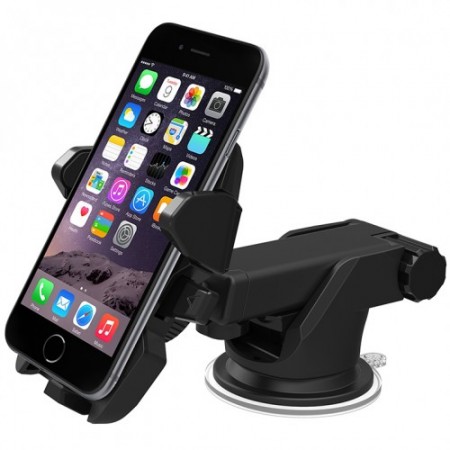
The iOttie Easy One Touch 6 works for a broad range of phones because it uses a physical clamp rather than a magnetic ring or model-specific case. The dashboard/windshield version accepts phones and cases from 2.3 to 3.5 inches wide and uses a one-touch release mechanism. Its telescoping arm extends from five to 7.5 inches, and the mount rotates for portrait or landscape viewing. That range matters in cars where the only workable mounting surface sits a little too close or too far away.
The clamp is its strength. A thick protective case, an Android without magnetic accessories, or an older iPhone can all fit without adding a metal plate. The phone is held by its sides, leaving the charging port accessible for a wired cable. That makes this a sensible pick for people who want a mount first and do not want to rebuild their phone case around a magnetic standard.
Installation deserves patience. iOttie directs users to clean the chosen surface, and its dashboard instructions note that a leather dashboard should use windshield mounting to avoid potential damage. The arm and base create more visual bulk than a small vent mount, and a tall placement can be distracting. Find a location with a clear sightline before pressing the base down. If the car has a soft, heavily textured, or curved dash, do not assume a suction pad will perform as it would on smooth glass.
The Easy One Touch 6 is not a wireless charger. That is a benefit for a buyer who prefers a dependable USB-C cable, and a limitation for a person who wants a single snap-on charging action. If you use it with a cable, leave enough slack for the arm to move without bending the connector. Check current iOttie Easy One Touch 6 listings on Amazon.
Choose Belkin when magnetic charging is worth the compatibility check
The Belkin BoostCharge Pro Magnetic Wireless Car Charger with Qi2 15W combines a vent mount and a charger for the right phone. Belkin lists up to 15W Qi2 charging, a stable vent mount, portrait or landscape positioning, a tethered 1.5 m USB-C cable, and a 20W USB-C Power Delivery car power supply. A compatible iPhone 12 or later can attach magnetically; Android use depends on a magnetic Qi2 or MagSafe-compatible case.
That direct alignment is the point. A phone can be placed and removed with one hand instead of opened through a clamp, and a correctly aligned Qi2 connection avoids the awkward half-on charging position common with simple wireless pads. Belkin backs the model with a two-year limited warranty and specifies a 15W maximum for Qi2-compatible iPhones. Actual charging speed still depends on the phone, case, alignment, active navigation load, and vehicle power.
Read the vent limitation literally. Belkin says its mount fits most vents, not every vent. Circular vents, very thin fins, wide horizontal vanes, or an air vent that must remain unobstructed can rule it out. The company also warns that warm air from a heater can contribute to phone overheating when the mount is directly in the airflow path. In a hot climate, a vent-mounted charging phone may need more attention than a non-charging dash mount.
Case thickness matters too. Belkin’s Qi2 vent mount documentation specifies cases up to three millimeters, including official MagSafe cases. A wallet, a thick rugged case, or a loose magnetic ring can reduce both holding strength and charging reliability. Confirm compatibility before buying. See current Belkin Qi2 car-charger availability on Amazon.
The Scosche MagicMount is a flexible non-charging magnetic option
The Scosche MagicMount Pro MS 4-in-1 is for a driver who wants magnetic convenience without paying for a charger they do not need. It includes a mount head, vent base, dash base, swing-arm, automotive-grade adhesive, and large and small MagicPlate components. The adjustable head works in portrait or landscape. iPhone 12 and later can use their built-in MagSafe magnets; older iPhones and Android phones can use the included MagicRing adapter.
The multiple bases are useful when the car changes. A driver can begin with the vent, switch to the dash if airflow or stability is a problem, and use the swing arm to bring the phone away from a vent or display. That flexibility comes with a more involved installation than a one-piece clip. The adhesive base is a real decision: clean the location, check the sightline, and avoid treating automotive adhesive as a casual temporary sticker.
Magnetic accessories are not invisible. A ring or plate changes the back of a case and can affect where a phone rests on some wireless chargers. Scosche gives placement guidance for wireless-charging phones; follow it rather than applying a plate wherever it looks centered. Do not use a magnetic wallet attachment behind the phone as the mounting interface. It can weaken the hold and creates an easy way to lose cards.
Skip this model if you expect a mount to charge the phone. Its value is a clean cradle-free hold and a choice of bases, not power delivery. Find the Scosche MagicMount Pro MS on Amazon.
Magnetic, clamp, and charging choices
Use a clamp mount when the phone has a thick case, lacks a magnetic solution, or needs broad compatibility. It is the least elegant mechanism but often the most forgiving. Use a magnetic mount when the phone or case has a secure, correctly positioned ring and you value one-handed placement. Use a magnetic charger only when you have confirmed phone, case, cable, and power compatibility. A magnetic charger that heats or charges slowly under navigation may be worse than a clamp and a reliable wire.
Wired charging is still worth considering for long navigation sessions, extreme temperatures, or phones that do not support the current wireless standard. Our USB-C cable guide can help select a cable that suits the power source in the car. Avoid a cable that is so long it tangles around controls, and never route a wire where it can interfere with a pedal, shifter, steering wheel, or airbag.
Wireless charging creates heat. That is normal, but heat combined with direct sun, a windshield, a heater vent, and navigation can make a phone throttle or pause charging. Use the car’s cooling thoughtfully, remove a thick case if the manufacturer permits it, and accept that a wired connection may be better on a long hot drive.
Install it once, then test it parked
Clean the surface with the supplied wipe or a method appropriate to the dashboard material, let it dry, and follow the manufacturer’s wait time before adding the phone. iOttie’s vehicle-screen mount instructions, for example, tell users to wait at least 20 minutes after installation. That kind of time is not filler. Adhesive and suction mounts need a stable bond before a phone’s weight, heat, and vibration are added.
With the car parked, test the mount with the exact phone, case, and cable you will use. Turn the wheel fully, operate the shifter, select the hazard button, and adjust climate controls. Make sure the phone cannot fall into the driver’s footwell. Check that no part of the mount blocks a camera, sensor, display, or required road view. A mounting location that is merely possible is not necessarily good.
Recheck a new installation after a few drives. Dashboard temperature changes and vibration can reveal a bad position. If the mount loosens, remove it safely and re-evaluate the surface instead of repeatedly pressing it back into the same unsuitable place.
Car-specific fit checks that prevent a bad purchase
Modern dashboards leave less spare space than older cars. A large central screen, shallow trim, pop-up display, or climate-control panel can turn a normal dashboard mount into a poor fit. Before ordering, measure the clear surface and check how far a phone would project from it. A telescoping arm can improve the angle, but it also increases leverage and can make a weak surface or loose base more obvious over rough pavement.
Vent design changes more than sellers suggest. A compact clip may fit a traditional horizontal slat but be a poor match for circular, vertical, recessed, or motorized vents. It may also close the vent when the phone is attached. In warm weather that is merely uncomfortable; in winter, heated air can put a charging phone in the warmest spot in the cabin. A driver who relies on a particular vent for defrosting or comfort should pick a dash or windshield option instead.
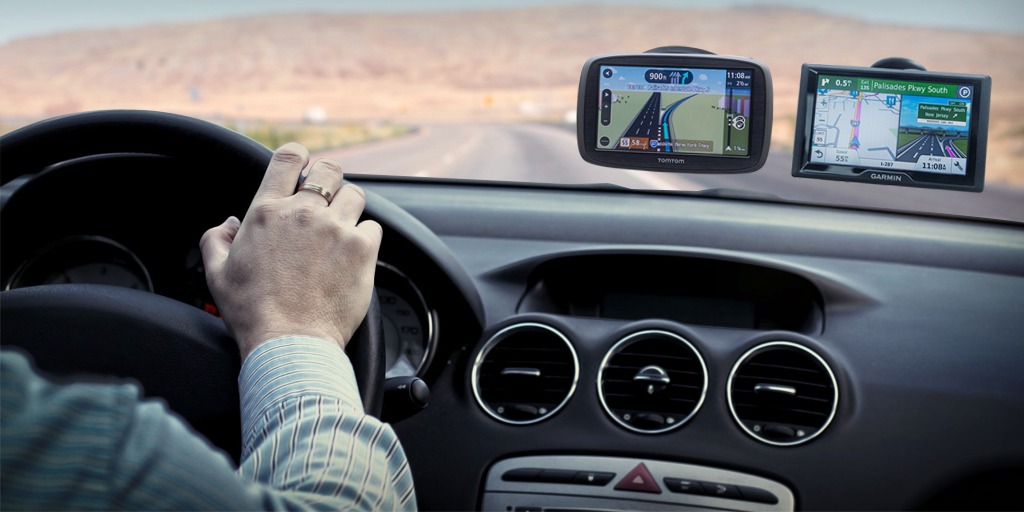
Vehicles with a built-in navigation display can make a phone mount unnecessary. Use the factory display when it provides the route and audio controls you need. A phone mount makes more sense when the car lacks a good navigation interface, when you need a different app, or when a passenger needs to manage the device. Our car GPS guide can help weigh a dedicated navigation device against using a mounted phone.
Common mount problems and how to avoid them
The usual problem is not a defective mount. It is a mismatch: an adhesive base on a textured dash, a vent clip on a weak fin, a magnetic charger behind a too-thick case, or a cable pulling the phone toward one side. Solve the source of the mismatch. Clean and dry the surface, use the base intended for the vehicle, choose a shorter cable route, or change mount type. Do not compensate with tape, an oversized metal plate, or a mount positioned over a control.
Charging failures deserve a simple sequence. First check that the phone and case are compatible. Then check cable seating and the output of the car adapter. Finally, check whether navigation, direct sun, and cabin heat have warmed the phone enough for it to reduce power. Do not assume that a 15W label means every phone will receive 15W in every drive. Wireless systems negotiate power, and temperature matters.
Magnetic mounts should be checked with a firm shake while the car is parked. If a phone moves noticeably, use a different case or mount. Never rely on a wallet, loose ring, or adhesive that is beginning to peel. A mount needs to secure the phone during an ordinary bump without becoming a project to remove at the end of every trip.
When you sell or replace a vehicle, inspect the mount before moving it. Adhesive bases may be designed for one installation, while vent clips and magnetic heads are easier to transfer. Keep the original spare plates, rings, and cleaning instructions with the mount so a later installation does not begin with improvised parts.
How we researched
We reviewed current manufacturer installation instructions, compatibility details, mount dimensions, charging standards, included power supplies, case limits, and stated mounting options. We selected a universal clamp, a Qi2 charging vent mount, and a flexible non-charging magnetic mount because they serve distinct phone and vehicle setups. We did not conduct crash testing or claim that any mount eliminates distraction. Confirm local rules, vehicle-specific airbag guidance, and exact phone and case compatibility before installation.
Car-mount questions, answered
Is a vent mount safe for my phone?
It can be, provided the vent is compatible and the phone is not exposed to strong heat or cold airflow. A charger in front of a heater vent deserves extra caution because heat can slow charging or warm the phone.
Will a magnetic mount work with Android?
Yes, when the phone has a compatible magnetic Qi2 or MagSafe-style case, or when the mount’s included adapter is used correctly. Check whether adding a ring affects your wireless charging.
Should I use the windshield or dashboard?
Choose the location that provides a clear, legal sightline and a stable surface without blocking controls or airbags. Windshield mounting can be adjustable; dashboards vary far more by material and shape.
Can a mount make phone use safe while driving?
No. It can make navigation easier to glance at, but route selection, typing, and detailed interaction should happen while parked. Use voice controls when appropriate and keep attention on the road.
Affiliate note: SuperGrail may earn a commission when you buy through an Amazon link. That does not affect our recommendations or the trade-offs we explain.