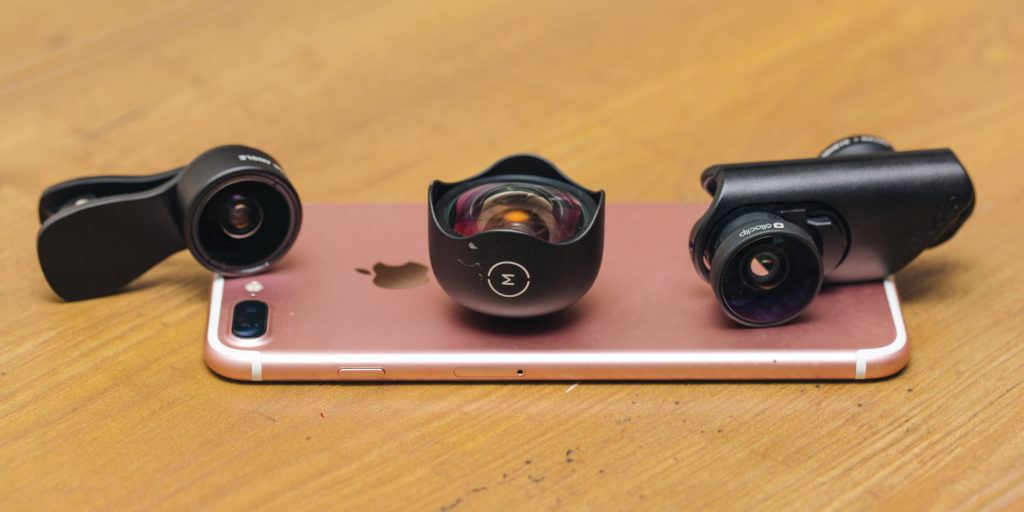
Most iPhone owners do not need an add-on lens. A current iPhone already has capable main, ultra-wide, and—on many Pro models—telephoto cameras. A cheap clip-on lens can slip, block another camera, catch flare, and leave you with an image that is worse than the phone’s own camera. The add-on lenses worth carrying do one specific thing: they let you use the iPhone’s main camera at a different focal length, make a true close-up composition possible, or give video a deliberate anamorphic look.
Mobile creators building a broader kit may also want our guides to computer monitors for photo and video work and wireless headphones for editing and travel.
For the first serious mobile lens, choose Moment’s T-Series Wide 18mm if you want a wider field of view from the main 1x camera for interiors, travel, architecture, and group shots. It requires a compatible Moment case and T-Series lens mount, which is the main cost and commitment. Choose the Moment Macro 10x II when your subject is tiny and you can work about an inch away. Buy SANDMARC’s Telephoto 6x only for genuinely distant subjects and only if you are willing to use the required case, manage a 16-foot minimum focus distance, and stabilize the phone. For video makers who want a stylized widescreen frame, Moment’s 1.33x Anamorphic II is the specialist choice.
The decisive detail is compatibility. An add-on lens must align over the intended camera, and newer iPhones can switch cameras automatically at close focus or low light. A lens may work with the main camera and be unsuitable for the ultra-wide or telephoto module. Check your exact iPhone, case, mount, and lens series before buying. Do not assume “fits iPhone” means it fits every camera on every iPhone.
How SuperGrail is supported: We may earn a commission when you buy through an Amazon link. That does not change our recommendations.Quick picks
| Pick | Buy it for | Skip it if |
|---|---|---|
| Moment T-Series Wide 18mm | Wider stills and video from the main camera, with a secure case-mounted system. | Your iPhone’s native ultra-wide already gives you the look you want or you do not want a dedicated case. |
| Moment T-Series Macro 10x II | Extreme close-ups of textures, small objects, plants, food details, and crafts. | You need a general-purpose lens or cannot work very close to the subject. |
| SANDMARC Telephoto 6x | Distant scenes with a manual focus wheel and a stable case-mounted setup. | Your subject is within 16 feet, you want a pocketable lens, or you will not stabilize the phone. |
| Moment T-Series Anamorphic 1.33x II | Intentional widescreen video, horizontal flares, and a specific visual style. | You mostly take stills or want a natural, no-processing workflow. |
When an iPhone lens is actually worth carrying
Start by identifying the limitation in your existing images. If your phone already makes a wide group photo you like, an external wide lens is an unnecessary extra. If you take close detail photos and the iPhone keeps changing lenses or cannot focus where you want, a macro lens might be useful. If you photograph wildlife, a distant stage, a skyline, or a long travel view, a telephoto can create a different composition from digital crop. The purpose needs to be frequent enough that you will bring the lens, case, caps, and cleaning cloth with you.
Add-on glass is not a universal image-quality upgrade. The iPhone’s camera system includes processing, stabilization, autofocus, and lens-specific corrections. An external lens changes the optical path. It can give you a perspective or working distance the phone does not otherwise provide, but it also asks more of your setup. A clean, well-aligned lens on the intended camera is essential. A smudged lens, off-center mount, or camera-switching mistake can waste a shot.
The most useful way to think about these products is as tools for the main camera. Moment says its T-Series lenses are designed to work especially with recent iPhone families through a T-Series case and drop-in mount; its current compatibility table covers iPhone 14 through 17 with T-Series and older iPhones with M-Series. SANDMARC’s longer telephotos also depend on a dedicated case mount. The case is part of the optical system, not a cosmetic accessory you can decide on later.
The wide-angle pick: Moment T-Series Wide 18mm
Moment’s T-Series Wide 18mm is the most broadly useful add-on lens because it offers a wide field of view from the iPhone’s main camera. Moment describes it as a 100-degree field of view and positions it over the 1x camera. That matters because the main camera is usually the one you would choose for its sensor, stabilization, and everyday image quality. The lens gives the main camera a wider viewpoint for interiors, architecture, landscapes, group shots, and video without asking you to use the phone’s native ultra-wide camera.
This is not an automatic replacement for the iPhone’s ultra-wide camera. The native ultra-wide is already there, requires no case or alignment, and is often the better tool when speed matters. The Moment lens earns its place for a photographer or video maker who prefers the rendering and workflow of the 1x camera but repeatedly needs more of the scene in the frame. That is a specific use case, not a universal improvement.
Moment requires a compatible T-Series case with a drop-in lens mount or a compatible universal mount. The bayonet mount is more reliable than a spring clip because it controls alignment, but it adds bulk and locks you into a case ecosystem. Before ordering, check the case page for the exact iPhone model and which camera receives the mount. Moment notes that its T-Series lenses are generally not meant for the iPhone’s ultra-wide module because the combination can produce vignetting.
Buy the Wide 18mm if you make wide images often enough to carry a lens case and if you understand that it belongs over the main camera. Skip it if your camera roll is mostly portraits, casual snapshots, or pictures taken in seconds. In those cases, the native camera is less fussy and more likely to be ready when the moment passes.
The close-up pick: Moment T-Series Macro 10x II
Moment’s Macro 10x II is for a photographer who wants to fill the frame with details that a normal camera view reduces to background texture. Moment says the lens focuses from roughly an inch away and uses its current T-Series mounting system. That makes it appropriate for jewelry, small product details, textures, food garnishes, craft work, insects that remain still, and close views of leaves or flowers. It is not a normal telephoto and will not focus on a subject across the room.
Macro photography has a narrow depth of field. At this distance, a small change in phone position can move the focus point from the subject’s edge to the background. Work in good light, hold the phone steady, and take several frames while shifting focus slightly. A very tiny subject may require the phone and subject to be nearly motionless. That is part of the appeal for a detail-focused photographer and a frustrating limitation for a casual snapshot.
Moment’s second-generation Macro II lenses use more glass than the original T-Series macro models; the company describes the update as roughly 30% sharper. Treat that as a manufacturer comparison rather than a guarantee about every subject. The more important buyer fact is the working distance. The Macro 10x is the choice when you can get extremely close. If you need a little more room between the phone and a skittish subject, Moment’s 75mm Macro II is the more suitable alternative, though it is still a specialist close-focus lens rather than a general portrait lens.
Turn off automatic macro or automatic lens switching if your iPhone starts fighting the attached lens at close distances. Moment specifically recommends adjusting those settings on the phone so the system does not jump to another camera. Use the mount that aligns the lens over the main camera, clean both the phone lens and the add-on lens, and avoid touching the glass while you frame. Close-up work makes every fingerprint conspicuous.
The distant-subject pick: SANDMARC Telephoto 6x
SANDMARC’s Telephoto 6x is a specialist lens for a subject that is genuinely far away. It has 6x magnification, a 144mm focal length, a manual focus wheel, a 17-degree field of view, a stated 16-foot minimum focus distance, and a weight around 215 grams. Those numbers tell you what the lens is for: wildlife, distant landscape layers, sports from the sideline, a far-away building detail, or travel scenes where walking closer is not possible.
It is not a lens for a person across a dinner table, a child in the same room, or an arm’s-length portrait. The 16-foot minimum focus distance is a hard limitation, not an inconvenience to solve with more tapping on the screen. SANDMARC says the lens uses a threaded mount on a compatible case and does not include or support a clip mount. That is sensible for a long, heavy lens, but it means the purchase is a system: lens, case, and possibly a tripod or grip.
Stabilization matters at this field of view. At a long focal length, small hand movement becomes obvious. SANDMARC recommends using the main 1x camera for sharpness and a tripod when combining the lens with a built-in 2x or 3x camera for higher magnification. Start more modestly. Mount the lens over the specified camera, focus with the wheel, support the phone, and use the lens at its intended 6x view before trying to stack more zoom on top of it.
Buy this lens if distance is the problem you repeatedly have. It is heavy, slow to set up compared with the bare phone, and too narrow for everyday travel snapshots. Its value is compositional: a distant subject fills more of the frame without relying only on a crop. If you simply want a slightly tighter portrait look, Moment’s lighter 58mm Tele is usually the more sensible kind of add-on.
The video-style pick: Moment T-Series Anamorphic 1.33x II
Moment’s Anamorphic 1.33x II is for a particular visual decision, not for ordinary family video. Moment describes the lens as producing a 1.33x squeezed widescreen image with horizontal flares and oval bokeh. It is aimed at people who want a cinematic frame and are willing to plan shots around that character. The second-generation T-Series version is listed for iPhone 14 through 17 with a case and drop-in mount.
Anamorphic footage needs a workflow. You may need to use an app or editing process that displays and exports the image with the correct de-squeeze. If you do not enjoy that small amount of post-production, choose the normal wide lens instead. The point of anamorphic is the style, including its flare behavior and wide aspect ratio. It is not a quiet technical upgrade that makes every video better.
The lens also adds a setup step when speed is often the point of filming on a phone. Attach it before a planned interview, short travel sequence, establishing shot, music video, or creative project. Leave it in the pouch for casual clips and important one-take moments. A phone with no accessory is still the better camera when the priority is getting the shot immediately.
Choose the right mounting system
A dedicated case-and-mount system is usually safer than a universal clip. It keeps the optical center aligned with the intended camera and reduces the chance that the lens will drift during a video. Moment’s current T-Series approach uses a case with a drop-in lens mount for newer iPhone models, while its older M-Series setup is for iPhone 13 and earlier. SANDMARC’s long Telephoto 6x requires a compatible case because the lens is too large for a clip.
A universal mount can be useful if a case is unavailable or you use several phones, but it asks you to align the lens carefully every time. Look at the preview for dark corners, a crescent of the case, or a soft edge before shooting anything important. Check that the lens does not overlap a neighboring camera or flash. A clip that touches the wrong part of the camera bump can make an expensive lens behave like a cheap one.
Phone cases change quickly after every iPhone generation. Treat compatibility as a purchase-day check, not a line copied from an old review. Confirm the lens series, case model, drop-in mount, and your exact phone before breaking the packaging. If you use multiple iPhones, do not assume a Pro case will work with the non-Pro model or that a prior-year camera cutout will align with a new one.
Use the main camera deliberately
External lenses are usually designed for a particular native camera, most often the 1x main lens. Moment’s current iPhone guidance says its wide and tele T-Series lenses should be used on the main camera, and it warns that mounting a lens over the ultra-wide can cause vignetting. The phone’s telephoto module has its own compatibility limits too. If an image suddenly has black corners, looks unusually soft, or refuses to focus, confirm which native camera is active before blaming the lens.
Disable camera settings that automatically switch lenses when you are using a macro attachment. On a recent iPhone, the normal automatic behavior makes sense when you have no external glass. With a mounted macro, it can put the phone on a camera that is no longer aligned. Use a camera app with a clear lens-selection control if the default app makes it difficult to tell what the phone is doing.
Do a ten-second test each time you mount a lens: wipe the glass, open the camera, check the corners, take a still image, and review it at full size. It is much easier to discover a mounting problem before a long take, a travel outing, or the few minutes of good light you were trying to use.
Support gear that helps more than a fourth lens
A small grip or tripod, a microfiber cloth, and a case that holds the lens securely may do more for your photos than buying a second specialty lens. A long telephoto needs stability. A macro lens needs controlled distance and light. A wide lens needs clean glass and careful framing at the edges. Pack the support gear that matches your one lens before building a bag full of optics you rarely mount.
Moving larger photos and video is a separate part of the workflow. If your iPhone uses USB-C and you transfer footage directly to a computer or external storage, use a data-capable cable rather than assuming every charging cable handles the job. Our guide to USB-C cables explains the specifications that matter for those connections. The lens does not change file handling, but it often encourages longer, higher-effort shooting sessions that make a reliable transfer setup worthwhile.
For a travel kit, keep lenses capped and separated from keys, coins, and loose chargers. A scratched front element is difficult to rescue in editing. Store the lens in its pouch, clean it with a blower or soft brush before wiping, and use a clean microfiber cloth for fingerprints. Do not leave a mounted lens loose in a bag where the phone can twist against it.
What we considered
We reviewed current manufacturer documentation for focal length or magnification, working distance, camera compatibility, mounting requirements, weight, case requirements, app workflow, and stated optical behavior. The recommendations deliberately cover wide composition, extreme close focus, long-distance work, and a stylized video look instead of presenting a lens kit as necessary for every iPhone owner. We checked that the selected lenses were findable on Amazon at the time of this update. We did not conduct laboratory sharpness tests, comparison shoots, or durability testing, and maker claims about optical performance are presented as their stated specifications rather than independent results.
iPhone lens questions answered
Do I need an add-on lens if my iPhone has an ultra-wide camera?
Usually no. Buy one only if you specifically want to use the main 1x camera at a wider angle, need a special macro or telephoto working distance, or want an anamorphic video style. The native cameras are simpler and faster for everyday shots.
Will a clip-on lens work with every iPhone?
Do not count on it. Camera-bump layouts, multiple camera modules, and case thickness all affect alignment. A dedicated compatible case and mount is the more dependable option, especially for a heavier telephoto lens.
Can I use a telephoto lens for portraits?
Some moderate telephoto lenses can work for portraits, but a long 6x lens is unsuitable at close range. Check its minimum focus distance first. SANDMARC’s Telephoto 6x cannot focus on a subject closer than 16 feet.
Why does my macro lens not focus?
Macro lenses have a narrow focus distance. Move the phone gradually toward or away from the subject, make sure the correct camera is active, and disable automatic lens switching if it sends the phone to another camera module. Good light and a steady subject help.
The practical choice
Buy Moment’s Wide 18mm if you repeatedly want a wider main-camera view. Buy the Macro 10x II for deliberate close work, not general photography. Choose SANDMARC’s Telephoto 6x for distant subjects only, and use Moment’s 1.33x Anamorphic II when a planned video style is the reason for the lens. If you cannot name the focal length or situation you are trying to solve, carry the bare iPhone and save the money.